Yuva Sathi Application Status 2026 – Complete Tracking Guide
Checking your Yuva Sathi Application Status 2026 helps you find the latest information about an application submitted under the Banglar Yuba Sathi scheme in West Bengal. After submitting an application, many applicants want to know whether their details have been received, whether verification is complete, or whether further action is required.
The Government of West Bengal provides an official portal for scheme-related information and application status. The portal currently states that the online application submission period has ended, with the closing time listed as 26 February 2026 at midnight. Existing applicants should use official channels to check their records and obtain updates. Official portal Official closure notice.
This guide explains how to access the official website, check your application information, understand possible status messages, and contact the help desk if you encounter a problem.
What Is Yuva Sathi Application Status 2026?
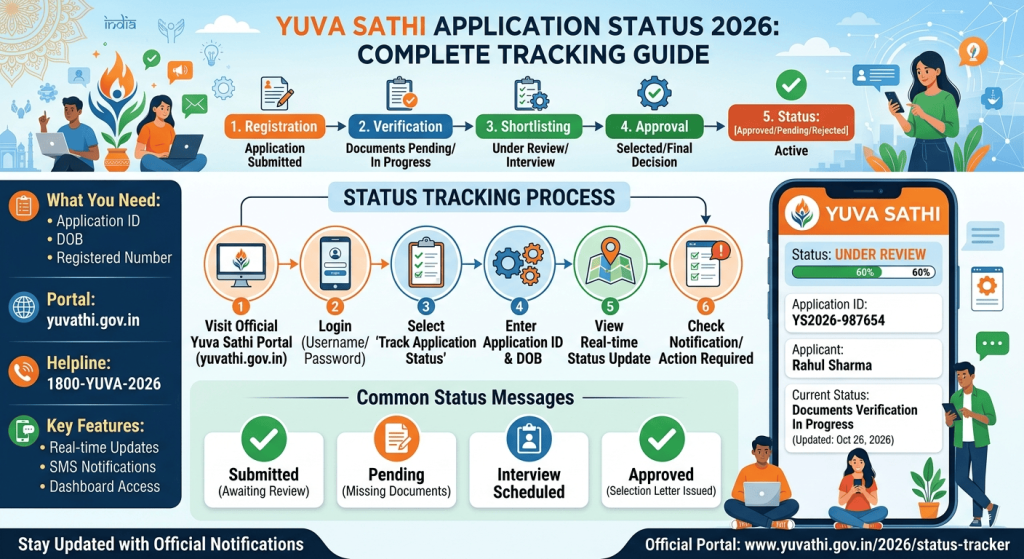
Yuva Sathi Application Status 2026 refers to checking the progress or available records of an application submitted under the Banglar Yuba Sathi scheme. The scheme was introduced by the Government of West Bengal to provide financial assistance to eligible unemployed young residents.
Under the published scheme guidelines, eligible beneficiaries were offered financial assistance of ₹1,500 per month for up to five years, subject to the scheme’s conditions. Eligibility included West Bengal residency, an age range of 21 to 40 years as of 1 April 2026, unemployment, and passing the Madhyamik or an equivalent examination. Scheme details.
Checking your application information can help you identify whether your record is available and determine whether you need to contact the department for clarification.
How to Check Yuva Sathi Application Status Online
Follow these steps to begin checking your application through the official government portal.
Step 1: Visit the Official Website
Open the official Yuva Sathi portal using your mobile phone or computer. Confirm that the website address ends with wb.gov.in to avoid confusing it with unofficial information websites.
Step 2: Find the Application Status Option
Look for the Application Status or status-check option on the portal. Select it and follow the instructions displayed on the official website.
The available options and page layout may change, so use the current instructions shown on the portal rather than relying entirely on screenshots from older guides.
Step 3: Enter Your Requested Information
Provide the application details requested by the official system. Depending on the available status-check process, you may need your registered mobile number or other application information.
Check every entry carefully before proceeding. Incorrect details can prevent the system from locating your record.
Step 4: Complete Verification
If the portal requests an OTP, secret PIN, captcha, or another verification step, follow the instructions provided. Use only the mobile number associated with your application when the system requires it.
Never share an OTP, password, or secret PIN with an unknown person claiming to help you check your status.
Step 5: Review the Available Information
After completing the required steps, review any application information displayed on the portal. If a status or reference number is available, save the details for future reference.
If you cannot access the status page or your application does not appear, contact the official help desk before assuming that your application has been rejected.
Common Yuva Sathi Application Status Messages
The exact wording of a status message depends on the information provided by the official system. The following explanations are general guidance, not a verified list of current portal status labels.
- Submitted: This generally means an application has been received or recorded. It does not necessarily mean approval.
- Under verification: This usually indicates that the submitted information or documents may still require checking.
- Pending: Further processing or an update may be awaited. Contact the department if the status remains unchanged for an extended period.
- Approved: If this message appears in the official system, read any accompanying instructions to understand the next steps and applicable conditions.
- Rejected: Check whether the portal provides a reason or instructions for clarification. Contact the help desk if you believe the information is incorrect.
- Record not found: Recheck the details you entered and contact official support if the problem continues.
Do not assume that an application is approved, rejected, or eligible for payment based only on an unofficial website or social media post.
What to Do If Your Application Status Is Not Showing
Sometimes applicants cannot find their information online. This does not automatically mean their application has been rejected.
First, confirm that you are using the official portal. Then check that the mobile number and any other requested information match your original application.
If you submitted a paper application at a government camp, explain this to the help desk and ask how to locate your record. Keep any application receipt or reference number available, if you received one.
If the website is temporarily unavailable, try again later. Avoid submitting sensitive documents through unofficial websites or paying someone who promises guaranteed approval.
For unresolved issues, use the official contact details listed below.
Official Yuva Sathi Help Desk Details
The official portal lists the following contact information for assistance and queries:
- Phone: 6292248888
- Email: yubasathi2026@gmail.com
- Official website: https://yubasathi.wb.gov.in/
Contact the help desk if your application details are missing, you cannot complete verification, or you need clarification about an official status message. Include only the information necessary to explain your issue, and avoid sending sensitive personal documents unless the department provides a verified and appropriate process.
Important Update About New Applications
The official portal states that the online application submission period has ended. Its closure notice specifies 26 February 2026 at midnight as the closing time and says that new applications or modifications will not be accepted after the deadline. Read the official notice.
Therefore, applicants should distinguish between checking an existing application and submitting a new one. Do not assume that registration has reopened unless the government publishes a new official announcement.
For further scheme information, consult the Government of West Bengal’s Banglar Yuba Sathi information page.
Frequently Asked Questions
1. How can I check Yuva Sathi Application Status 2026?
Visit the official Yuva Sathi portal, locate the application status option, and follow the instructions displayed. Provide the requested application details and complete any verification steps.
2. Is Yuva Sathi registration currently open?
The official portal states that the application submission period has ended. Check official announcements for any future changes before attempting to register.
3. What should I do if my application status is not available?
Check your information for errors and try again. If your record remains unavailable, contact the official help desk at 6292248888 or email yubasathi2026@gmail.com.
4. Does a submitted status mean my application is approved?
No. Submission generally indicates that an application has been received or recorded. Approval and payment eligibility must be confirmed through the official process.
5. Where can I find genuine Yuva Sathi updates?
Use the official portal at https://yubasathi.wb.gov.in/ and relevant Government of West Bengal information pages. Be cautious of websites promising guaranteed approval or asking for unofficial fees.
Conclusion
Checking your Yuva Sathi Application Status 2026 is an important step in following the progress of an existing application. Start with the official portal, enter the requested details carefully, and review any information or instructions provided by the government system.
If your record is missing, a status message is unclear, or you need further assistance, contact the official help desk. Since the published application window has closed, rely on verified government announcements for future updates rather than assuming new applications are being accepted.