Yuva Sathi Application Rejected: Solutions and What to Do Next
Have you checked your Banglar Yuva Sathi application status and found that your application has been rejected? This can be frustrating, especially if you were expecting financial assistance from the West Bengal government.
A rejection does not always mean that you made a serious mistake. Your application may have an eligibility issue, incorrect information, missing documents, or a verification problem.
In this guide, you will learn why a Yuva Sathi application may be rejected, how to check the status, what steps to take, and how to contact the official help desk for assistance.
Important: The online application submission period for Banglar Yuva Sathi officially closed on 26 February 2026. The official portal currently states that new applications and modifications are no longer accepted. Therefore, contact the department before assuming that you can submit a corrected application.
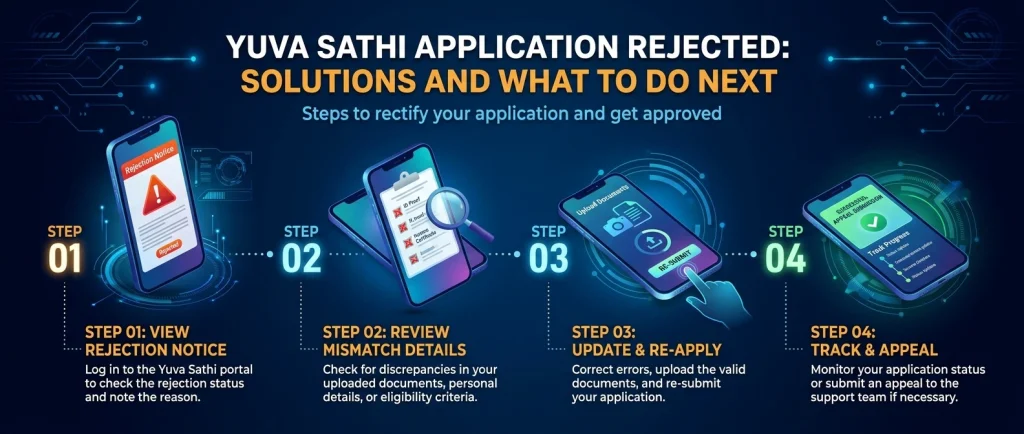
Why Was My Yuva Sathi Application Rejected?
There can be different reasons why an application does not pass the verification process. The exact reason should be confirmed through the official portal or the department’s help desk.
Here are some possible issues applicants should check.
1. Incorrect Personal Information
Incorrect details in the application form can create verification problems.
For example:
- Spelling mistakes in the applicant’s name.
- Incorrect date of birth.
- Wrong mobile number.
- Different personal details across submitted documents.
Compare the information in your application with your original documents to identify possible differences.
2. Missing or Incorrect Documents
Applicants were required to provide supporting documents during the application process. Missing, unclear, or incorrect documents may create verification difficulties.
The required documents included:
- Madhyamik or equivalent examination admit card.
- Madhyamik marksheet or educational qualification certificate.
- Aadhaar card.
- Voter ID card.
- First page of the bank passbook.
- Recent passport-size photograph.
- Applicant’s signature.
- SC/ST/OBC certificate, where applicable.
Check whether the documents you submitted were complete, readable, and belonged to you.
3. Age Eligibility Problem
The scheme’s eligibility requirements specify an age range of 21 to 40 years as of 1 April 2026.
If your age did not fall within the required range on the specified date, your application may not meet the eligibility conditions.
Check your date of birth against the official eligibility requirements.
4. West Bengal Residency Requirement
Banglar Yuva Sathi is intended for eligible permanent residents of West Bengal.
If your submitted documents do not establish your West Bengal residency, the verification process may raise an issue.
Check the residential information and identity documents you provided.
5. Educational Qualification Issue
Applicants must have passed the Madhyamik examination or an equivalent examination.
If your educational qualification details are incorrect or the submitted certificate cannot be verified, your application may face difficulties.
Keep your original marksheet or certificate available when contacting the help desk.
6. Employment or Other Government Assistance
The scheme is intended for eligible unemployed youth.
Applicants who are employed or receive certain other government financial assistance may not meet the scheme’s conditions. Educational benefits and scholarships are treated differently under the scheme guidelines.
Review your employment status and any other government benefits you receive.
7. Bank Account Information Mismatch
Incorrect bank information can create verification or payment-related problems.
Check the following details:
- Account holder’s name.
- Bank account number.
- IFSC code.
- Bank branch details.
- Whether the account belongs to the applicant.
The scheme guidelines require the bank account to be in the name of the eligible applicant.
How to Check Yuva Sathi Application Status
Before taking any action, confirm the actual status of your application.
Follow these steps:
- Visit the official Banglar Yuva Sathi Portal.
- Look for the Application Status option.
- Follow the instructions displayed on the portal.
- Enter the requested application or registration details.
- Complete OTP verification or other required verification, if prompted.
- Check the status displayed on the screen.
Keep your application acknowledgement or registration details available.
If you cannot find your application status, contact the official help desk rather than relying on an unofficial website.
Yuva Sathi Application Rejected: What Should You Do?
If your application shows a rejected status, follow these practical steps.
Step 1: Confirm the Rejection Status
First, make sure that the application actually shows Rejected.
Do not confuse the following situations:
- Pending: The application may still be under review.
- Under Verification: Officials may still be checking the submitted details.
- Rejected: The application has not been accepted.
- Approved: The application has passed the relevant approval process.
The exact status labels and their meanings should be confirmed through the official portal.
Step 2: Find Out the Reason for Rejection
Do not immediately submit another application or make changes without confirmation.
Contact the Yuva Sathi help desk and explain that your application has been rejected.
Ask whether the rejection is related to:
- Personal information.
- Missing documents.
- Eligibility requirements.
- Bank details.
- Verification records.
Understanding the reason will help you decide what to do next.
Step 3: Keep Your Original Documents Ready
Prepare the documents you submitted during registration.
These may include your Aadhaar card, Voter ID, Madhyamik certificate, bank passbook, photograph, and application acknowledgement.
Having these documents available can help the officials investigate your issue.
Step 4: Contact the Official Help Desk
The official Banglar Yuva Sathi portal provides the following contact details:
- Help Desk Number: 6292248888
- Email Address: yubasathi2026@gmail.com
Explain your problem clearly and provide your application reference details when requested.
Do not share your OTP, password, or other confidential information with unknown callers or unofficial agents.
Step 5: Ask Whether Review or Correction Is Possible
Since the application submission period has closed, applicants should not assume that they can edit or resubmit a rejected application.
Ask the help desk whether your specific case can be reviewed, whether any correction process is available, and whether additional documents can be provided.
Follow only instructions confirmed by the department.
Can I Reapply If My Yuva Sathi Application Is Rejected?
The answer depends on the official instructions and whether the government announces another application window.
According to the current official portal notice:
- The online application period ended on 26 February 2026.
- New applications are not being accepted.
- Modifications to submitted applications are also not being accepted.
Therefore, submitting a completely new application is not currently an available solution under the published notice.
If your application was rejected, contact the help desk to ask whether any review or grievance procedure applies to your case.
How to Avoid Yuva Sathi Application Rejection in the Future
If the government announces another application opportunity, these precautions may help prevent common application problems.
- Enter your personal information carefully.
- Use correct details from your original documents.
- Upload clear and readable document scans.
- Check your educational qualification information.
- Confirm that you meet the age and residency requirements.
- Provide accurate bank account information.
- Use an active mobile number.
- Review the complete application before submission.
- Keep your acknowledgement or registration number safe.
Always read the latest official scheme instructions before applying.
Difference Between Yuva Sathi Rejected and Pending Status
Understanding the difference between application statuses can help you avoid unnecessary worry.
| Application Status | Meaning | Recommended Action |
|---|---|---|
| Submitted | Application has been received | Keep acknowledgement details |
| Pending | Application may be awaiting processing | Check for updates |
| Under Verification | Details are being checked | Wait for the official decision |
| Rejected | Application has not been accepted | Contact the help desk |
| Approved | Application has been approved | Follow official benefit instructions |
The portal’s displayed status and any specific instructions from the department should take priority over general explanations.
Frequently Asked Questions
1. Why was my Yuva Sathi application rejected?
Possible reasons include incorrect personal details, document problems, eligibility issues, residency verification, or bank information mismatches. Contact the official help desk to confirm the specific reason.
2. Can I correct my rejected Yuva Sathi application?
The official portal currently states that application modifications are no longer accepted after the 26 February 2026 closing date. Contact the help desk to ask whether any review or correction procedure is available for your case.
3. Can I apply again after Yuva Sathi rejection?
A new application cannot currently be submitted under the published portal notice because the application period has closed. Wait for an official announcement about any future application opportunity.
4. How can I complain about a rejected Yuva Sathi application?
Contact the official help desk at 6292248888 or email yubasathi2026@gmail.com. Explain your problem and provide your application reference details.
5. What documents should I keep ready after rejection?
Keep your Aadhaar card, Voter ID, Madhyamik admit card, marksheet or certificate, bank passbook, photograph, and application acknowledgement ready.
6. Does a pending Yuva Sathi application mean rejection?
No. Pending generally indicates that the application has not received a final decision. Check the official portal for updates or contact the help desk if the status remains unchanged.
7. Is there any fee to check Yuva Sathi application status?
Use the official government portal for status-related services. Be cautious of websites or individuals demanding money to check your application or promise guaranteed approval.
Final Thoughts
A rejected Yuva Sathi application can happen for several reasons, including eligibility concerns, incorrect information, or document verification problems.
The best first step is to confirm your application status and ask the official help desk for the exact rejection reason. Keep your original documents and application acknowledgement ready.
Remember that the online application period closed on 26 February 2026, and the official portal currently does not accept new applications or modifications. Always follow the latest instructions issued by the West Bengal government instead of relying on unofficial promises of guaranteed correction or approval.