Yuva Sathi Application Form Fill Up Guide: Step-by-Step Process
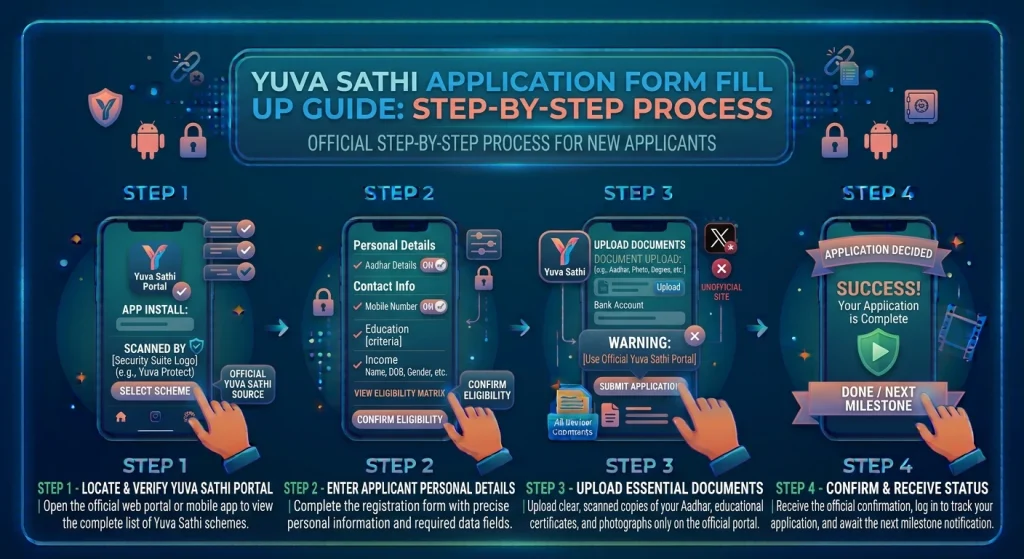
The Yuva Sathi Application Form Fill Up Guide explains how eligible applicants can prepare their documents, complete the application form, and follow the instructions for the Banglar Yuba Sathi Scheme in West Bengal. If you are applying for the first time, understanding the form and checking your details carefully can help you avoid common mistakes.
The scheme is intended to provide financial assistance to eligible unemployed youth who meet the government’s requirements. Before applying, applicants should confirm the latest eligibility conditions, application dates, and submission instructions through official government sources.
In this article, you will learn how to fill out the Yuva Sathi application form, which documents may be needed, how to submit the form, and what to do after applying.
What Is the Banglar Yuba Sathi Scheme?
Banglar Yuba Sathi is a West Bengal government scheme designed to provide financial assistance to eligible young people who meet the prescribed conditions.
According to published scheme information, eligible beneficiaries may receive ₹1,500 per month for a specified period, subject to the official rules. Eligibility may depend on age, residency, educational qualifications, employment status, and other conditions.
Applicants should read the current guidelines before completing the form. For scheme information, visit the MyScheme official portal.
Yuva Sathi Application Form Fill Up: Required Documents
Before beginning the application process, organise the documents requested in the current official instructions. Depending on the application procedure, applicants may need the following:
- Madhyamik or equivalent examination admit card
- Madhyamik marksheet or educational certificate
- Aadhaar card, where required
- Voter ID or other accepted identity or residence proof
- Bank passbook or accepted bank account details
- Recent passport-size photograph
- Applicant’s signature
- Category certificate, if applicable
- Active mobile number for verification
The exact document checklist can vary according to the official form and application method. Check the instructions on the form before preparing your final documents.
Make sure that scanned documents are readable, complete, and in the required file format. Do not upload altered or incorrect documents.Related Yuva Sathi Guides
After completing the Yuva Sathi application form, you may want to learn what happens next. Read our guide on Yuva Sathi Application Submitted: What Next? to understand application follow-up steps.
If you cannot find your application reference details, read our guide on Yuva Sathi Registration Number Kaise Find Karein for more information.
Yuva Sathi Application Form Fill Up: 7 Easy Steps
Follow these seven steps to understand the application process. The exact procedure may differ depending on whether the government is accepting online applications, printed forms, or applications through designated camps.
Step 1: Check the Official Application Notice
First, check whether applications are currently open and which submission method is authorised.
Use official West Bengal government websites and published scheme notices. Do not rely only on social media posts or third-party websites for application dates.
You can begin by checking the West Bengal government portal and the relevant department’s announcements.
Step 2: Obtain the Correct Application Form
If the government has released an official application form, obtain it through the authorised portal, department, or designated application camp.
Check that you have the correct form for the Yuba Sathi Scheme. Read all instructions before writing anything.
If online registration is available, open the official application page and follow the displayed registration procedure.
Step 3: Enter Your Personal Details
Complete the personal information section carefully. The form may ask for details such as:
- Applicant’s full name
- Father’s or mother’s name
- Date of birth
- Gender
- Residential address
- Mobile number
- Identity information
- Category details, if applicable
Use the same spelling and date of birth shown on your supporting documents. If the form specifies a particular format, follow it.
Do not leave mandatory fields incomplete or enter guessed information.
Step 4: Fill In Your Educational Details
Enter your educational qualification according to your original documents.
Check the examination name, qualification details, and any other information requested by the form. If the scheme requires a Madhyamik or equivalent qualification, ensure that you meet the applicable criteria.
Review the educational section before continuing.
Step 5: Provide the Required Bank Details
If the application form asks for bank information, enter the details exactly as instructed.
Check the account holder’s name, account number, and other requested information against your bank documents. Follow the scheme’s current rules concerning account ownership and Aadhaar linking, where applicable.
Never share your banking PIN, password, or OTP with an unofficial agent.
Step 6: Attach Documents and Complete the Form
For an online application, upload the required files in the formats and sizes accepted by the portal.
For a printed form, attach the requested document copies and photograph according to the instructions.
Before proceeding, check that:
- Every required document is included.
- Your photograph and signature meet the stated requirements.
- The documents are clear and readable.
- All mandatory fields have been completed.
- You have signed the form wherever required.
Step 7: Review and Submit Your Application
Review the entire form before final submission. Pay special attention to your name, date of birth, address, educational information, and bank details.
If the portal allows you to correct errors, make the necessary changes before submitting.
After successful submission, save or print the acknowledgement, application reference number, or receipt if one is provided. This information may be useful for checking your application status later.
Important: Filling out a form does not automatically mean that your application has been submitted or approved. Look for an official confirmation.
How to Fill Out the Offline Yuva Sathi Application Form
If offline applications are officially available, follow the instructions provided with the printed form.
- Obtain the prescribed form from an authorised source.
- Read the instructions carefully.
- Fill in all applicable fields using the required format.
- Attach the documents requested in the checklist.
- Add your photograph and signature where required.
- Review all entries for spelling or numerical errors.
- Submit the completed form to the authorised office or camp.
- Keep the acknowledgement or receipt if one is issued.
Do not assume that an old application form or previously announced camp is still valid. Confirm the current process before visiting an office or submitting documents.
Common Mistakes to Avoid During Yuva Sathi Form Fill Up
Errors in the application form may lead to delays or verification problems. Avoid these common mistakes.
Incorrect Personal Information
Ensure your name, date of birth, and address match your documents. Review all numbers carefully before submitting the form.
Missing Documents
Use the latest official checklist to confirm that every required document has been included.
Unclear Document Scans
Blurry photographs or incomplete scans can make verification difficult. Prepare clear copies before uploading or attaching them.
Incorrect Bank Information
Check the requested bank details against your passbook or official banking records.
Ignoring Eligibility Conditions
Read the age, residency, education, employment, and other eligibility rules before applying.
Not Saving the Acknowledgement
Keep your application number and submission receipt safe. These may help you track the application or contact the relevant department.
Trusting Unofficial Agents
Avoid anyone promising guaranteed approval in exchange for money. Use official government channels for application assistance.
How to Check Yuva Sathi Application Status
After submitting your application, check whether the official portal provides a status-checking facility.
Follow these general steps:
- Open the official scheme portal.
- Look for an application-status or tracking option.
- Enter the reference number or other information requested.
- Complete any verification step shown on the page.
- Review the displayed status and save the result if needed.
The status-checking process may change, and an online tracking facility may not always be available. If you cannot find your application, verify that the submission was completed and contact the authorised department for guidance.
Do not share your personal application details on unofficial websites claiming to check your status.
What to Do If You Cannot Submit the Form
If you experience problems during the application process, try the following:
- Check whether the official portal is working.
- Make sure your internet connection is stable.
- Confirm that uploaded files meet the format and size requirements.
- Check for missing mandatory fields.
- Try a supported browser or another device if the page is not loading.
- Keep a screenshot of any error message.
- Contact the official department or authorised help desk if the problem continues.
If applications are closed, wait for an official announcement rather than relying on websites promising late registration.
Frequently Asked Questions
1. How can I fill out the Yuva Sathi application form?
Check the official application notice, obtain the correct form, enter your details, attach the required documents, review the information, and submit it through the authorised method.
2. Which documents are required for Yuva Sathi?
Applicants may need educational documents, identity or residence proof, bank details, a photograph, a signature, and a category certificate where applicable. Follow the latest official checklist for the exact requirements.
3. Can I complete the Yuva Sathi application form on my mobile?
If the official portal supports mobile access and online applications are open, you may be able to complete the process using a smartphone. Prepare your documents in the accepted formats before starting.
4. Is offline application available for Yuva Sathi?
Offline applications may be accepted when the government announces an authorised process or designated camps. Check the latest official notice before submitting a printed form.
5. What should I do if I make a mistake in the form?
If editing is permitted before submission, correct the information and review it again. If the form has already been submitted, contact the authorised department for instructions.
6. How can I check my Yuva Sathi application status?
Use the official tracking facility if available. Enter the reference information requested by the portal and follow its instructions.
7. Is there an application fee?
Check the official scheme instructions for any applicable requirements. Do not pay unofficial agents who claim they can guarantee approval or speed up your application.
8. Where can I find official Yuva Sathi updates?
Start with the official West Bengal government website and the MyScheme information page. Follow current government notices for eligibility requirements, application dates, and submission instructions.
Final Words
The Yuva Sathi Application Form Fill Up Guide helps applicants understand the steps involved in preparing and submitting an application. Organise your documents, enter accurate details, review the form carefully, and keep your acknowledgement safe after submission.
Most importantly, confirm the latest scheme rules and application availability through official government sources. This will help you avoid outdated instructions, incorrect forms, and unofficial websites.
Before applying, make sure that you meet the eligibility requirements and use only the submission method currently authorised by the government.